
Teacher planning for this module
Welcome to Year 6 Computing! 💻
Today is all about learning how to keep your personal information safe and mastering your computer skills. Let’s get started on our very first mission!
Step 1: Spot the Hazard! 🕵️♀️
Look closely at the messy computer desk below. Can you spot all the hazards?
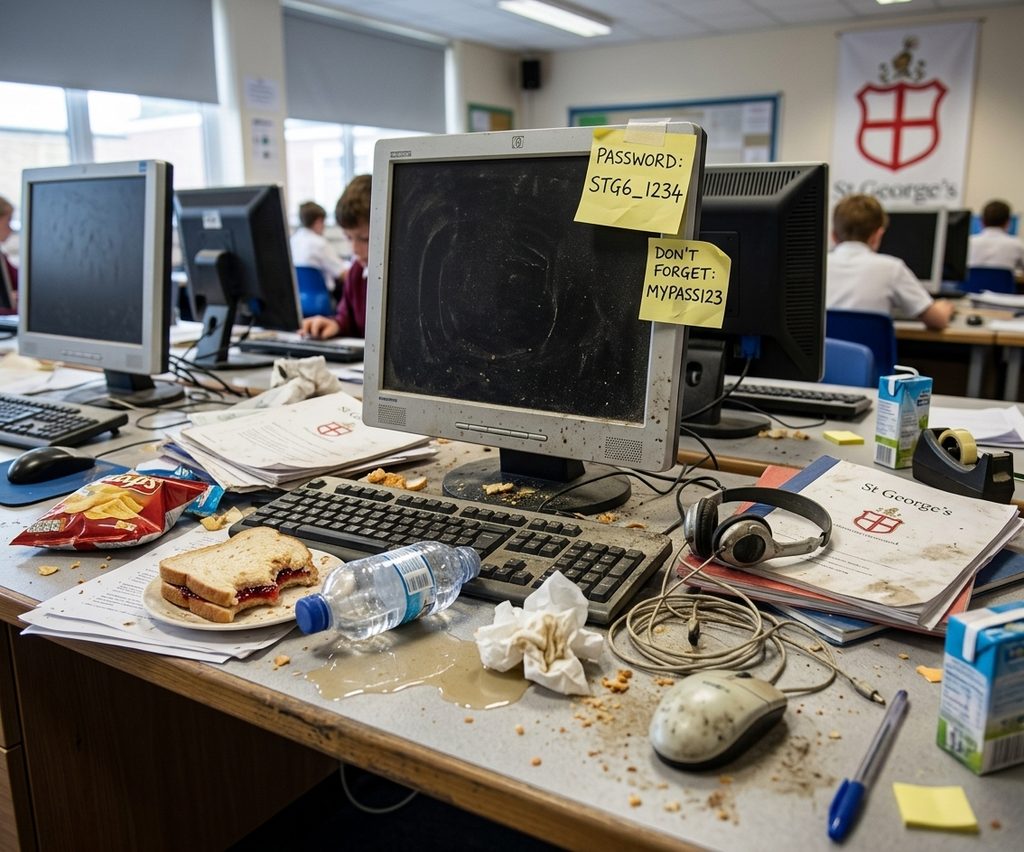
- Let’s figure out our classroom rules together so we can keep our equipment working perfectly and our information secure.
Step 2: Password Power 🔐
Your password is like the front door key to your digital house. We need to make sure it is super strong!
- Instead of a single word, the best passwords are passphrases—a mix of random words stuck together.
- We will test some ideas on the board to see how strong they really are.
Step 3: Mission Log In 🚀
Now it is your turn to take the controls!
- Turn on your computer and use your IT letter to log in for the very first time.
- Carefully change your password to the special one given to you on your green sheet. Make sure it matches exactly, or you might get locked out next time!
Step 4: Time to Type! ⌨️
Let’s practice your keyboard skills and train your muscle memory.
- Click here to start today’s challenge: Start Typing Practice
- Try typing out sentences about online safety. Remember: focus on getting the letters right before trying to go super fast!
Step 5: Secure and Log Off 👋
Before our lesson ends, you must secure your workstation.
- Exit Ticket: Think of one real-world problem that could happen if someone guessed your password and share it with the class.
- Log out of your computer, test logging back in one more time, and make sure your desk is clean and tidy.
Comments are closed, but trackbacks and pingbacks are open.