
Welcome back to Year 6 Computing! 🖼️
Today we are looking at how we share information online. Media are made by people who make choices, and this activity helps you see yourself as a media maker when deciding what to share online. Let’s dive in!
Step 1: Time to Type! ⌨️
- Click here to warm up your fingers: Start Typing Practice.
- Today’s typing challenge focuses on privacy and thinking before we post. Remember to focus on getting the letters exactly right!
Step 2: Frame It! 📸
Visual media makers control how much information they want to share by framing. They decide what to include inside the frame (what we can see), and what stays outside the frame (what is invisible). Work through the interactive activity below.
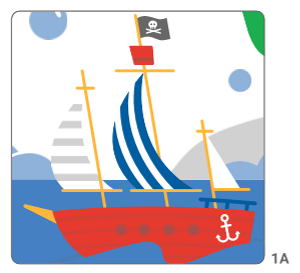
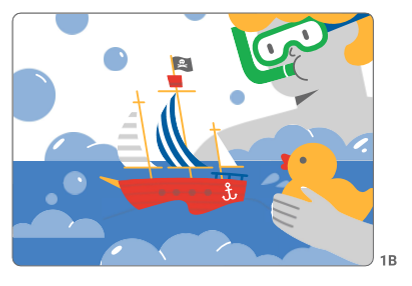

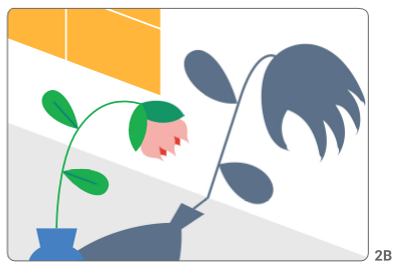
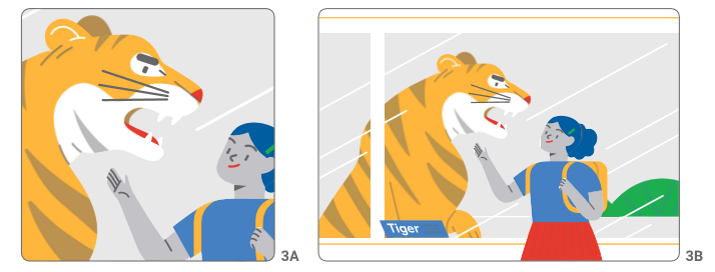
Step 3: Keep the Kingdom Kind 🎬
Every time you share something online, you are making media. Like the producers of a film, video or TV show, you can decide what people will see (what is inside the frame) and what stays out of sight (what is outside the frame).
- Click here to practice sharing safely: Play Interland.
- Your specific mission today is to travel to Mindful Mountain to learn about sharing carefully and protecting your digital footprint.
Step 4: Log Off and Reflect 👋
- Exit Ticket: Think about a photo you might share online this weekend. Tell your partner one thing you would deliberately keep “outside the frame” to protect your personal privacy.
- Log out securely and tidy your desk space!
Comments are closed, but trackbacks and pingbacks are open.